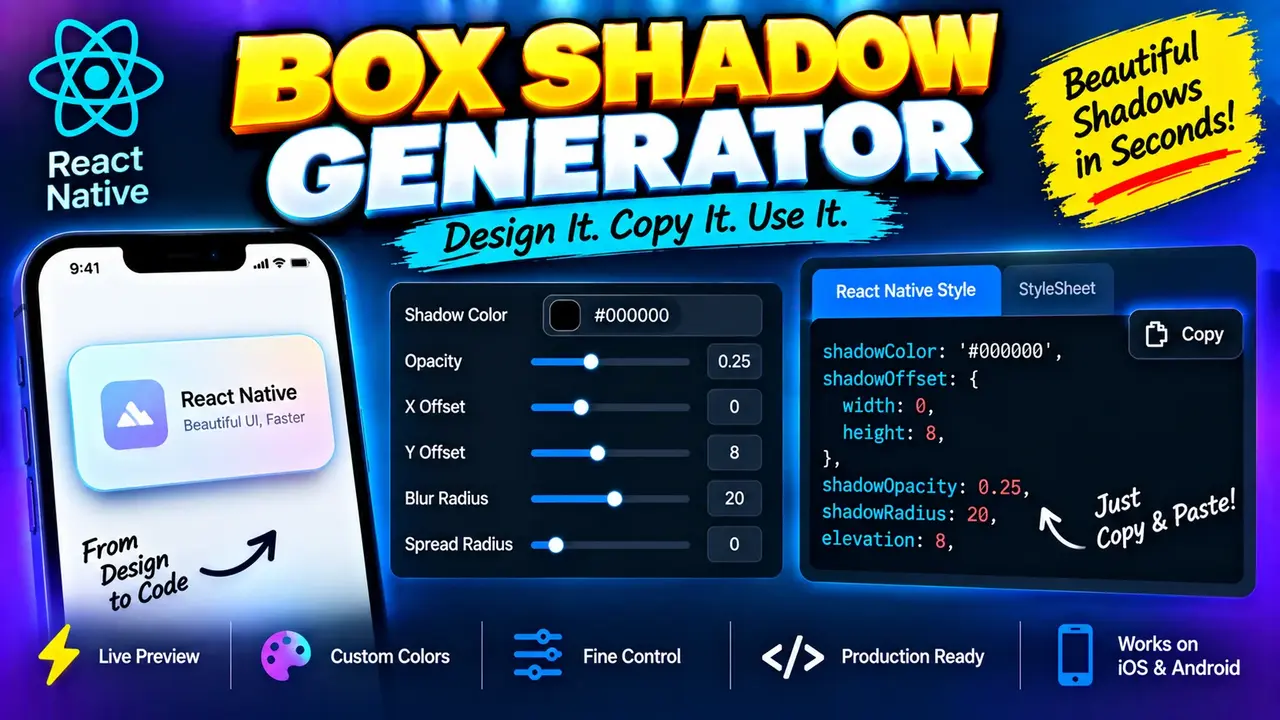
React Native Box Shadow Generator
TL;DR Summary
The React Native Box Shadow Generator helps developers create React Native box-shadow styling values from shadow settings and use the resulting code in a project. The supplied tool information does not confirm its exact internal controls, output format, or privacy behavior, so results should be checked in the target React Native environment before production use.
About This Tool
The React Native Box Shadow Generator is a developer utility for creating box shadow styling for React Native interfaces. It is designed for situations where you want to add depth, separation, elevation-like visual effects, or a softer edge around a component without manually writing every shadow value.
Box shadows can be useful for cards, buttons, panels, dialogs, menus, navigation elements, and other interface components. A shadow can make an element appear raised above a background or help separate nearby sections. Writing shadow values by hand can also require repeated trial and error, especially when adjusting horizontal offset, vertical offset, blur, spread, opacity, or color.
This generator is intended for people working with React Native, including frontend developers, mobile app developers, UI developers, and designers who need a practical way to create or adjust shadow styling. It can also be useful when converting a visual design idea into values that can be tested in a React Native component.
What the React Native Box Shadow Generator Does
The core purpose of the tool is to turn shadow settings into React Native-oriented shadow output. The exact controls and generated syntax are not specified in the supplied tool information, so the page should be understood as a generator for React Native box shadow styling rather than as documentation for a particular hidden implementation.
Standard shadow controls may include values such as horizontal offset, vertical offset, blur radius, spread or expansion, shadow color, and opacity. However, only controls actually presented by the live tool should be used. If a particular option is not available in the interface, there is no need to provide it as an input.
Typical Inputs
A React Native shadow generator may use numerical and color-based inputs to describe the desired shadow. Common shadow concepts include:
- Horizontal offset: Moves the shadow to the left or right.
- Vertical offset: Moves the shadow up or down.
- Blur radius: Controls how soft or spread out the shadow edge appears.
- Spread or expansion: Changes the apparent size of the shadow when supported by the target shadow model.
- Shadow color: Sets the color used for the shadow.
- Opacity: Controls how visible the shadow appears when the implementation exposes opacity separately.
These are standard shadow concepts, not a claim that every one is an input in the supplied implementation. Use the fields displayed by the generator as the authoritative input set.
What the Output Represents
The expected purpose of the output is React Native-compatible shadow styling that can be applied to a component. Depending on the implementation, the generated result may contain individual React Native style properties or another code representation suitable for copying into a stylesheet or component.
React Native shadow behavior can differ between platforms and React Native versions. For that reason, generated values should be tested on the platforms your application supports. A shadow that looks subtle on one platform may appear different on another.
How to Use the React Native Box Shadow Generator
- Step 1: Open the React Native Box Shadow Generator and review the shadow controls available in the tool.
- Step 2: Enter or adjust the available shadow values, such as offsets, blur, color, opacity, or other supported settings.
- Step 3: Review the generated React Native shadow output and check that the values match the visual effect you want.
- Step 4: Copy the generated styling into the appropriate React Native component or stylesheet.
- Step 5: Test the shadow on the target device or platform and adjust the values if the visual result needs refinement.
Technical Explanation and Standard Shadow Logic
A box shadow is generally described using a combination of position, softness, size, color, and transparency. A standard shadow model can be represented conceptually as:
Shadow = horizontal offset + vertical offset + blur + optional spread + color/opacity
The horizontal offset determines the shadow's position along the X axis. A positive value generally moves the shadow toward the right, while a negative value generally moves it toward the left.
The vertical offset determines the shadow's position along the Y axis. A positive value generally moves the shadow downward, while a negative value generally moves it upward.
The blur value controls the softness of the shadow. Smaller blur values produce a sharper edge. Larger values create a softer transition between the shadow and the background.
Spread is supported by some shadow models and controls how far the shadow expands or contracts before blur is applied. It should not be assumed to be available in every React Native shadow implementation.
Color identifies the base shadow color. Opacity controls how strongly that color appears when opacity is represented as a separate value. A semi-transparent dark shadow is a common design pattern, but the appropriate value depends on the background, component, and visual design.
The exact internal formula used by the generator is not provided in the supplied tool information. Therefore, the description above explains the standard shadow model rather than claiming a hidden implementation formula.
Preset Examples and Quick Reference
| Shadow Setting | Typical Visual Effect |
|---|---|
| Small offset + low blur | Subtle separation from the background |
| Moderate offset + moderate blur | Visible elevation for cards or panels |
| Low offset + larger blur | Soft, diffuse shadow |
| Larger offset + larger blur | More pronounced depth effect |
For example, a design may call for a component shadow that is slightly offset downward and softened with blur. You would enter the available horizontal and vertical offsets, choose an appropriate blur value, set the shadow color and transparency if those controls are provided, and then inspect the generated React Native output. The correct values depend on the design and should be verified visually rather than treated as universal presets.
React Native Shadow Considerations
React Native shadow styling deserves extra attention because shadow support and rendering behavior can vary by platform. Developers should not assume that a single set of properties will produce identical pixels across iOS and Android. The generated code is a starting point for implementation and visual testing.
If your project uses a newer React Native version or a specific rendering approach, check the relevant React Native documentation and your project's supported properties. If a generated property is not supported by your target environment, it may need to be replaced with the shadow properties supported by that environment.
Why Use This React Native Box Shadow Generator & How Our React Native Box Shadow Generator Beats the Competition
The practical value of a generator is that it gives you a focused place to work with shadow values instead of starting every shadow from an empty style object. The comparison below describes general workflow differences rather than claiming that the Toolhox generator is superior in every situation.
| Method | Ease of Use | Calculation Speed | Best For | Limitations |
|---|---|---|---|---|
| Toolhox React Native Box Shadow Generator | Focused interface for generating shadow styling | Immediate when using the available generator controls | Developers who want React Native shadow output | Generated styling still needs testing in the target app and platform |
| Manual calculation | Requires writing and adjusting values yourself | Depends on manual editing | Developers who already know the desired values | More manual trial and error |
| Spreadsheet calculation | Requires setting up cells and formulas | Depends on spreadsheet setup | Custom experiments with repeated numeric values | Not specifically focused on React Native shadow styling |
| Professional design or development software | Depends on the application and workflow | Depends on the application | Broader UI design and development work | May include many features beyond a focused shadow generator |
Assumptions and Limitations
The React Native Box Shadow Generator should be treated as a development aid, not as a guarantee that a generated shadow will look identical on every device. The supplied information does not document the exact internal implementation, supported React Native versions, platform-specific behavior, or complete list of inputs and outputs.
Shadow appearance depends on the values entered, the component size, the background, the device platform, the React Native version, and the rendering environment. A visually pleasing shadow in a design mockup may need adjustment in the actual application.
The tool should not be used as a substitute for testing production UI on the platforms your application supports. Developers should also confirm that generated properties are supported by their project's React Native version and target platforms.
The supplied tool information does not specify how user-entered data is processed, transmitted, or stored. Do not enter sensitive information into the tool unless the page itself clearly explains its data-handling behavior.
Who Should Use It?
This tool is useful for React Native developers, mobile application developers, UI implementers, frontend developers, and designers working with React Native interfaces. It is especially relevant when you need to experiment with shadow depth or turn a visual shadow concept into reusable React Native styling.
For production applications, use the generated result as implementation input and verify the final appearance in the actual application. This is particularly important when supporting both major mobile platforms or when matching a specific design system.
