Gram To Sheet Weight Calculator For Cardstock
Calculate cardstock sheet weight from GSM, paper size, and sheet quantity. Get estimated weight per sheet and total weight in grams, ounces, and kilograms.
Please complete this field to continue.
Please complete this field to continue.
Please complete this field to continue.
Please complete this field to continue.
Please complete this field to continue.
Results
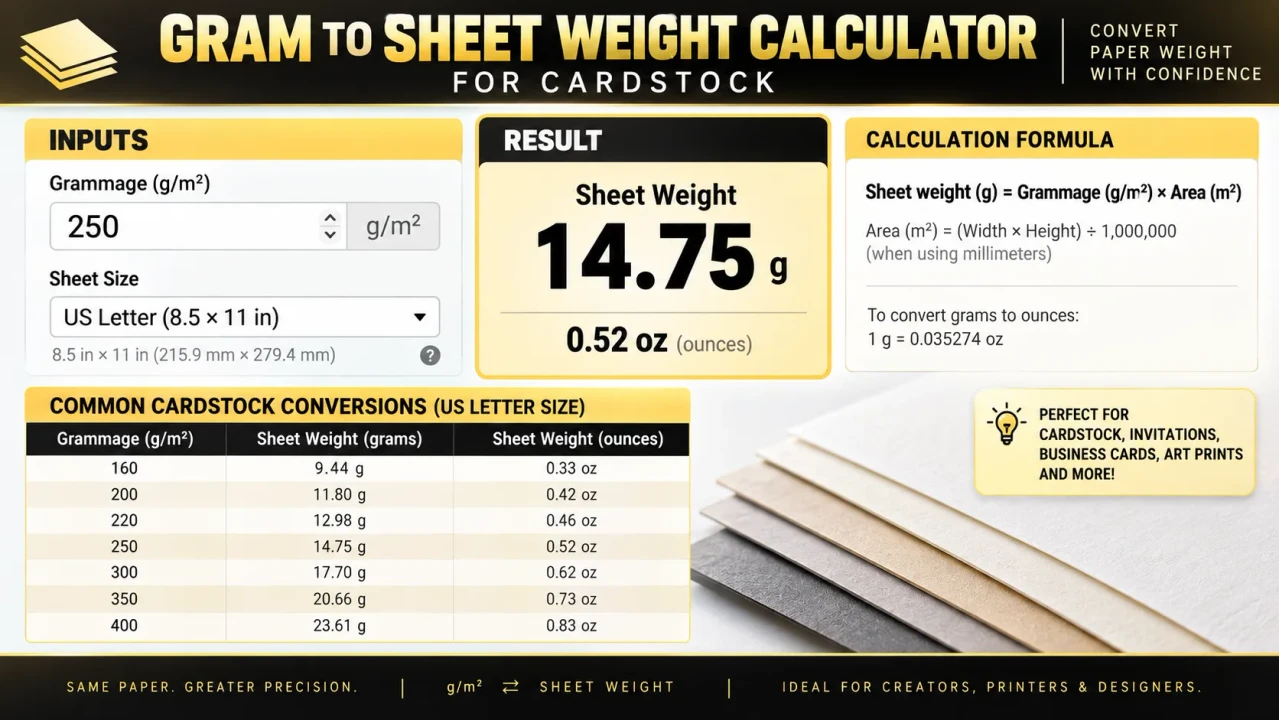
Gram To Sheet Weight Calculator For Cardstock
TL;DR Summary
The Gram To Sheet Weight Calculator For Cardstock estimates the weight of one cardstock sheet, or a group of sheets, from the sheet size and GSM (grams per square meter). It is a theoretical paper-weight calculation, so actual manufactured stock can vary slightly, and the supplied tool information does not specify how user data is stored or transmitted.
What This Calculator Does
The Gram To Sheet Weight Calculator For Cardstock helps you turn a cardstock GSM value into an estimated physical sheet weight. This is useful when a paper package gives you the material weight in GSM but you need to know how much an individual sheet weighs in grams or ounces.
GSM means grams per square meter. It describes the nominal mass of one square meter of paper or cardstock. It does not mean that one finished sheet weighs the same number of grams. The finished sheet may be much smaller than one square meter, so its actual mass is lower.
For example, a sheet of US Letter cardstock measures 8.5 by 11 inches. Its area is about 0.060322 square meters. If the cardstock is 250 GSM, the theoretical weight of one sheet is about 15.08 grams. The calculation comes from multiplying the sheet area by the GSM value.
This tool is designed for people who work with cardstock, paper crafts, printing, stationery, invitations, greeting cards, packaging, cutting projects, and other applications where sheet weight matters. It can also help when estimating the weight of a stack of cardstock.
What You Enter
The calculator uses a small set of inputs. First, choose the cardstock size. Preset options include US Letter, US Legal, US Tabloid, A4, A3, and A5. If your cardstock uses another size, choose Custom Size and enter its width and height in millimeters.
Next, enter the cardstock weight in GSM. For example, you might enter 200, 250, or 300 GSM when those are the values listed by the paper supplier. GSM is the key material-weight input for this calculation.
Finally, enter the number of sheets. Use 1 when you want the estimated weight of a single sheet. Enter a larger number when you want to estimate the total paper weight of a stack.
What You Get
The calculator returns the estimated weight per sheet in grams. It also converts the result to ounces. When you enter more than one sheet, it calculates the total weight of the group in grams, ounces, and kilograms.
The result is based on the dimensions and nominal GSM that you enter. It does not require the physical sheet to be weighed first. This makes the calculation useful when you are planning a project and only have the paper specification available.
How to Use
- Step 1: Select the cardstock size that matches your sheet. Choose Custom Size if the sheet does not match one of the listed standard sizes.
- Step 2: If you selected Custom Size, enter the sheet width and height in millimeters.
- Step 3: Enter the cardstock GSM value shown on the package, product specification, or supplier information.
- Step 4: Enter the number of sheets you want to estimate. Enter 1 for one sheet.
- Step 5: Review the calculated weight per sheet and the total weight for the selected quantity.
Technical Explanation and Formula
The standard calculation for sheet weight from GSM is:
Sheet Weight (g) = Sheet Area (m²) × GSM (g/m²)
When the sheet dimensions are entered in millimeters, the sheet area is:
Sheet Area (m²) = Width (mm) × Height (mm) ÷ 1,000,000
The complete calculation is therefore:
Sheet Weight (g) = Width (mm) × Height (mm) × GSM ÷ 1,000,000
For multiple sheets:
Total Weight (g) = Sheet Weight (g) × Number of Sheets
The calculator converts grams to ounces using approximately 28.349523125 grams per avoirdupois ounce:
Weight (oz) = Weight (g) ÷ 28.349523125
It converts grams to kilograms using:
Weight (kg) = Weight (g) ÷ 1,000
The calculation keeps the main intermediate values at full floating-point precision and rounds the displayed results. This avoids unnecessarily rounding the sheet area before calculating the weight.
Worked Example: 250 GSM US Letter Cardstock
Suppose you have 250 GSM cardstock in US Letter size. The sheet is 8.5 × 11 inches, which is 215.9 × 279.4 millimeters.
First calculate the area:
215.9 × 279.4 ÷ 1,000,000 = 0.06032246 m²
Then multiply the area by the GSM:
0.06032246 × 250 = 15.080615 g
So one 250 GSM US Letter sheet has a theoretical weight of about 15.08 grams. In ounces, that is about 0.532 oz.
If you have 100 sheets, the estimated paper weight is about 1,508.06 grams, or 1.508 kg, before considering packaging, coatings, printing, moisture, or other added material.
Common Cardstock Size Reference
| Size | Dimensions | Dimensions in mm |
|---|---|---|
| US Letter | 8.5 × 11 in | 215.9 × 279.4 mm |
| US Legal | 8.5 × 14 in | 215.9 × 355.6 mm |
| US Tabloid | 11 × 17 in | 279.4 × 431.8 mm |
| A4 | 210 × 297 mm | 210 × 297 mm |
| A3 | 297 × 420 mm | 297 × 420 mm |
| A5 | 148 × 210 mm | 148 × 210 mm |
Why Sheet Size Matters
GSM describes mass per square meter, so sheet size directly affects the weight of the finished sheet. Two cardstock sheets can have the same GSM but different sheet weights when their dimensions are different.
A larger sheet contains more square meters of material. At the same GSM, that larger area produces a higher sheet weight. This is why a 250 GSM A3 sheet weighs about twice as much as a 250 GSM A4 sheet. The same principle applies to custom cardstock sizes.
GSM Is Not the Same as Thickness
GSM measures mass per unit area. It does not directly measure thickness, stiffness, or bending strength. Two paper products with the same GSM can have different thicknesses because paper construction, density, coatings, fibers, and manufacturing methods can differ.
This distinction matters when choosing cardstock for invitations, cards, packaging, crafts, or printing. If a project has a strict thickness or stiffness requirement, check the manufacturer's technical specification instead of using GSM alone.
When This Calculator Is Useful
- Estimating the weight of individual cardstock sheets.
- Estimating the paper portion of a stack or batch.
- Planning craft and stationery projects.
- Comparing the theoretical weight of different sheet sizes.
- Estimating paper mass before printing or cutting.
- Checking whether a planned quantity of cardstock may be relatively heavy.
Why Use This Gram To Sheet Weight Calculator For Cardstock & How Our Calculator Beats the Competition
The practical difference is mainly the calculation method and the amount of manual work required. The Toolhox calculator combines common sheet-size choices, a custom-size option, GSM input, and sheet quantity in one calculation. Other methods can produce the same mathematical result when the same inputs and formula are used.
| Method | Ease of Use | Calculation Process | Best For | Limitations |
|---|---|---|---|---|
| Toolhox Calculator | Enter size, GSM, and quantity | Automated area and weight calculation | Quick cardstock sheet-weight estimates | Results depend on the entered dimensions and nominal GSM |
| Manual Calculation | Requires more steps | Convert dimensions, calculate area, then multiply by GSM | Checking or learning the formula | More opportunity for unit or arithmetic errors |
| Spreadsheet | Requires a prepared sheet | Formula must be entered and maintained | Repeated calculations and custom workflows | Requires spreadsheet setup and correct formulas |
| Professional Paper or Production Software | Varies by application | May include broader production calculations | Detailed print or manufacturing workflows | May include features beyond what is needed for a simple sheet-weight estimate |
Assumptions and Limitations
This calculator provides a theoretical weight based on nominal GSM and the entered sheet dimensions. It assumes a rectangular sheet and treats the stated GSM as the material's mass per square meter.
The calculated result is not a direct measurement of a physical sheet. Actual cardstock can differ slightly from the nominal specification. Moisture, manufacturing tolerances, coatings, laminates, ink, toner, adhesive, packaging, and other added materials can change the final measured weight.
The calculator also does not determine paper thickness, caliper, stiffness, density, basis weight, shipping cost, postage, or packaging weight. It should not be used as the sole basis for a specification where a supplier's measured or certified material properties are required.
For shipping or postage planning, remember that the paper weight is only part of the final package weight. Add envelopes, boxes, wrappers, labels, inserts, and other materials separately. For production or purchasing decisions with tight weight tolerances, use the supplier's actual product specification or weigh a representative sample.
The calculation is a general mathematical paper-weight method rather than a claim about the hidden implementation of any other calculator. Standard GSM-to-sheet-weight calculations use sheet area in square meters multiplied by GSM. :contentReference[oaicite:2]{index=2}
